Try claude-garage in your browser
claude-garage is a terminal wall that shows every Claude Code session at once and turns the one that needs you amber. This page simulates it, so you can learn the keys with your real keyboard in about two minutes, with nothing to install.
Eight short lessons. Install later with one command.
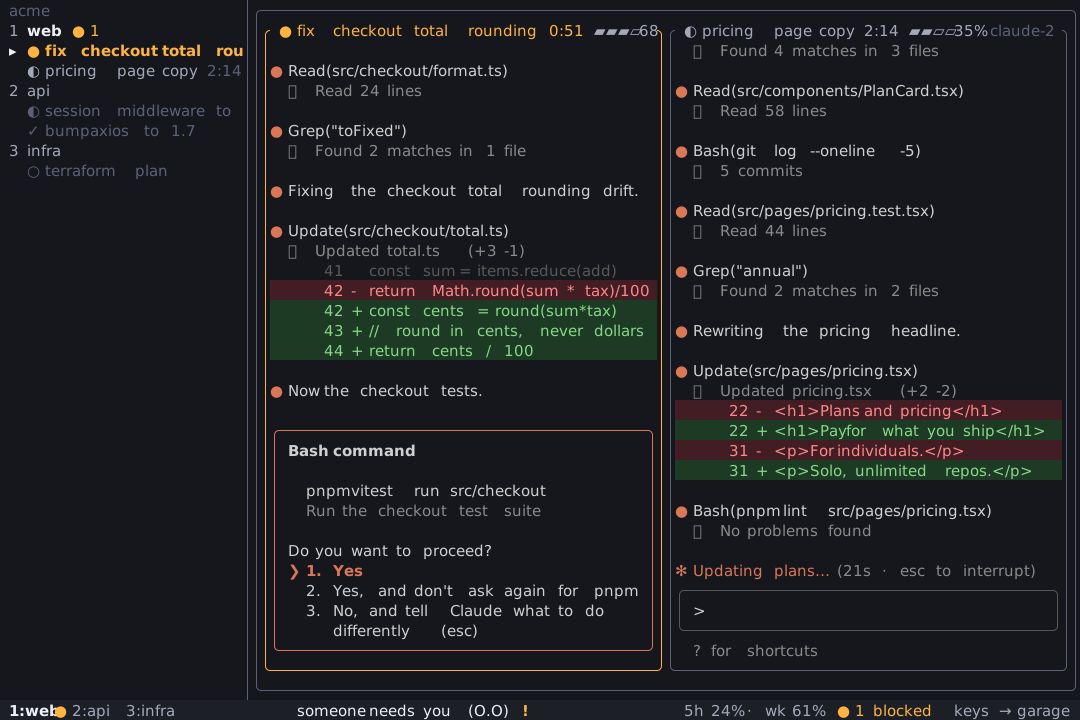
Click the wall to focus it, or tap the keys below.
Which keys does claude-garage use?
This is the full key list from the real app, the same one that ? opens on the wall. The first eight lessons cover the ones you will use every day.
| Key | What it does |
|---|---|
| 1-9 | focus workspace |
| [ ] | cycle focused tile |
| Enter | engage focused tile (restore it when restorable) |
| Ctrl+G | disengage (while engaged) |
| m | maximize / restore focused tile |
| t | open focused session in a new terminal window (macOS) |
| a | jump to longest-waiting blocked session |
| A | triage queue |
| b | hide / show the sidebar (drag its edge to resize) |
| < / > | narrow / widen the sidebar |
| n / N | spawn session / worktree session |
| R | restore all restorable sessions in workspace |
| I | install hooks (instant status) + context meter feed |
| x x | close focused session (press twice) |
| r r | restart focused session, resumes on the current claude binary |
| r a | restart idle/done sessions in workspace |
| r d | restart the daemon (sessions untouched) |
| X X | remove focused workspace (sessions keep running) |
| X K | remove focused workspace AND kill its sessions |
| Shift+↑↓ | move focused workspace up / down (persists) |
| w | add workspace |
| d | detach focused session to its own view, or rejoin main |
| D | move focused session to another view / new group |
| Tab | cycle the focused workspace's views |
| ? | toggle this help |
| q | quit (tmux sessions keep running) |
What do the colors on the wall mean?
The wall keeps one loud color. Amber means a session is waiting for you, and nothing else is ever amber.
- Working
- Quiet gray half-circle. Claude is busy and does not need you.
- Needs input
- Amber dot. A permission question or a prompt is waiting for you. The only loud state.
- Done
- Green check. Fresh completions stay green, then fade.
- Idle
- Dim circle. The session is open and waiting for your next prompt.
How is the simulation different from the real wall?
The wall here is drawn in HTML and scripted. No Claude, tmux or network is involved, and the transcripts are canned. The layout, glyphs, colors, keys and overlay wording follow the real terminal app. Differences you may notice: the done color fades in seconds instead of two minutes, Esc releases your keyboard (a real engaged session would receive it), and only the keys from these lessons are wired up.
Ready for the real thing? Follow the install guide, then build your first wall. Working in parallel branches? See worktree sessions, and how nothing gets lost when you restart.